
 If you see the error “We’re sorry Thunderbird had a problem and has crashed”, all is not lost. I’ll take you through some fault-finding stages that may help.
Here’s what the window looks like on most computers:
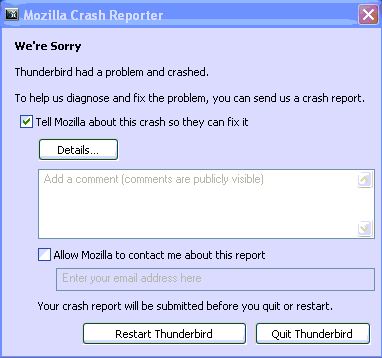
Yikes, not great information there and submitting information to Mozilla doesn’t help you in the short term, although it helps them to develop the software better.
OK, the first step I take is to download and install the excellent free MozBackup from here:
https://mozbackup.jasnapaka.com/download.php
Close all open programs and run the tool. Create a backup accepting all the default options (this backs up everything).
Now we can work on the program without risk of losing data. Download the latest version of Thunderbird from here:
https://www.mozilla.org/en-US/thunderbird/all.html
Now we are going to run the installation program and install it to the exact same location your existing one is in. Note, we are not uninstalling the existing version. If you are not sure of the location, accept the defaults. The installation program will not tell you it has detected an existing version but that’s OK.
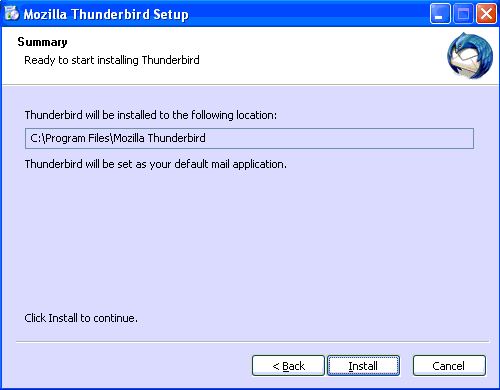
For reference, I have done this countless times and the last was overwriting a version 8 with version 9. If you are running a really old version then there may be a compatibility issue but I haven’t found anything that version 9 can’t successfully overwrite yet.
Restarting Thunderbird after the reinstall
Now we can start Thunderbird. It may prompt to update plugins which you can accept or disable those you don’t use. You should find your data exactly as you had before. In my experience, you only need to fill in your SMTP server details (if at all). If you have anything missing you can run MozBackup to reinstate it.
Install any plugins or add-ons that aren’t there that you previously had such as Spam filtering (via an Internet Security package or other such as SpamFighter etc).
Job’s a good’un and you should now have a fully functioning Mozilla Thunderbird without the “We’re sorry Thunderbird had a problem and has crashed” window!
 Midnight Commander is a great free file manager but the problem is people are overwhelmed by the interface. Here is a quickie Midnight Commander tutorial so you can navigate and get to the files you want.

 Here are the current email settings for Tiscali users. Tiscali has been taken over by TalkTalk but users are still advised to use the old ‘legacy’ settings listed below.
 Many emails about how to access the recovery partition on Dell Inspiron and Dimension PCs. I have noticed that Dell don’t give this information unless you pay for their premium tech support so here we go, hope this helps a few people…..
 The following is my procedure for restoring Acer laptops and desktops to factory settings. You will need to ensure that laptops are plugged in at the mains charger as this is critical.